

The College has now migrated all website learning resources into TalentLMS. These resources will soon be removed from the website.
TalentLMS will look different the next time you log in. Please follow the instructions below to navigate the new layout. We recommend using Category View for the best experience.
If you have never accessed TalentLMS, please email om@rnzcuc.org.nz as soon as possible.
How to Use Category View
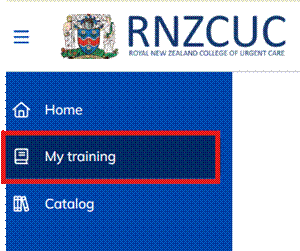
- Once logged in, click “My Training” in the left hand vertical column.
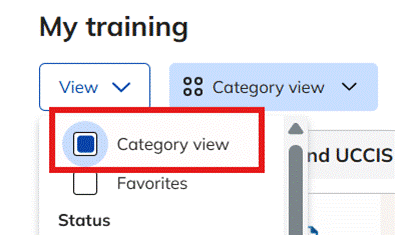
- Click “View” and tick “Category View” so your courses are grouped clearly. This allows you to navigate the learning resources easily.
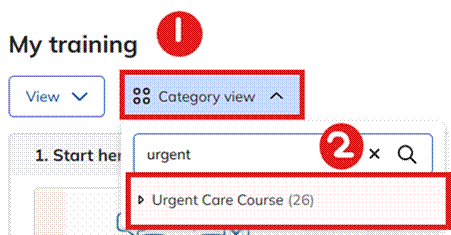
- You can search for specific courses by clicking on “𓃌 Category View” and by searching for the specific categories, i.e. Urgent Care Course.
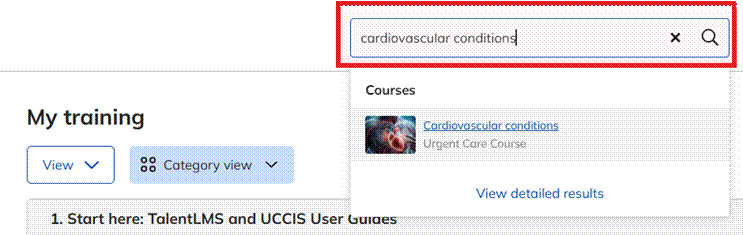
- Alternatively, you can search for specific courses by using the search bar at the top of the page.
It is recommended that you read the newly published TalentLMS User Guides:
- TalentLMS User Guide for Fellows
- TalentLMS User Guide for Trainees
- TalentLMS User Guide for Educational Subscribers
- TalentLMS User Guide for Supervisors
If you are still struggling to navigate TalentLMS, please email the Operations Manager, Cleo (om@rnzcuc.org.nz)